How to Give Access to Facebook and Google My Business Pages for Directory Management
As part of directory management, we will need access to your Facebook page and Google My Business Pages.
For Facebook:
- I will send a message to your business pages.
- While on your page, go to Settings at the top right.
- From there, you'll click "Page Roles" and type "Ark Eting" and click the one that matches the Logo on my profile picture.
- Once you find me, change the role to "admin" and you'll have to type in your personal password to approve the added role.
For Google My Business:
- Sign in to Google My Business.
- Click the gear icon or three dot menu on the location group/business account you’d like to manage and click Manage users.
- Add the email address of the user to whom you’d like to send an invitation (admin@arkbsc.com). You can invite me to be an owner or manager of the location group/business account, whichever your preference.
Only an owner of the location group/business account can add more owners and managers.
________________________________________________________________________________________________________
Opt in for Yext Updates
Lastly as part of this service we can automatically reach out to you for updates on hours and services (AT NO EXTRA COST)!
In order to opt in, you'll just need to follow the instructions that will be emailed to you from Yext directly. Here is a sample of what the email will look like:
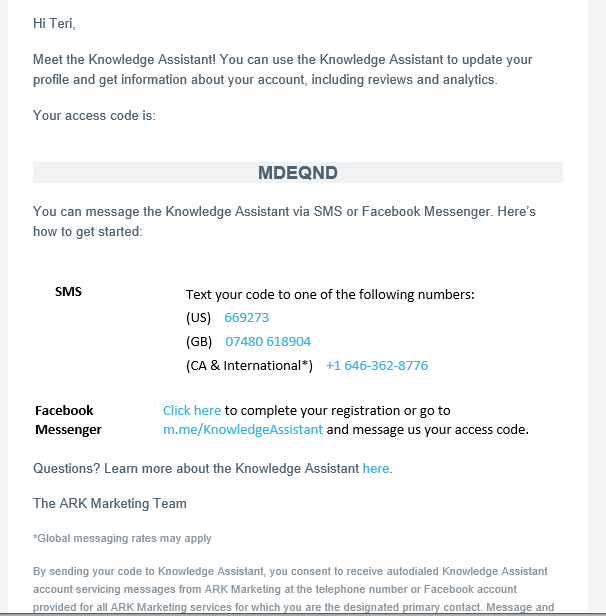
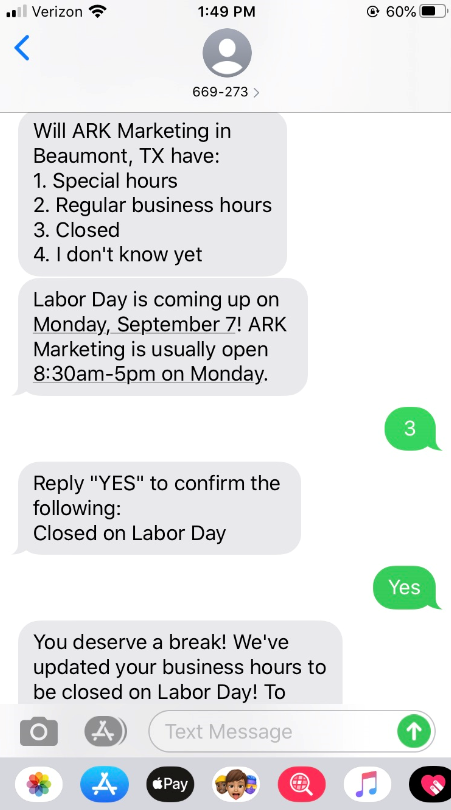
Once you've opted in, you'll receive text or Facebook messages (whichever your preference) for holiday hour verifications. We promise, you won't be inundated, we receive them ourselves!
Here is a sample of what the messages will look like and how easy it is to respond:
We encourage you to utilize this free add-on but if you'd prefer NOT to opt-in for the free service, no problem; all you have to do is ignore the email from Yext and it'll go away :)
Related Articles
Your Small Business Guide to Instagram - Part 1
We have completed a two-part guide to help small businesses out there make the most out Instagram accounts. Social media can be a little confusing and it’s ever changing so we want to share some valuable information that can help you get on the right ...How to Boost a Post on Facebook
You’ve posted something on Facebook, and it’s good. Really good. But now you want to make sure more people see it. Maybe it’s a new product you’re offering, a special promotion, or even just a post you’re proud of. Facebook’s Boost Post feature is ...Your Small Business Guide to Instagram - Part 2
HASHTAGS So, what’s the deal with hashtags? Instagram is one of the few social media platforms where organic reach is still possible by simply using the appropriate hashtags. Use a # for hashtags but not be confused with @ symbol which is used for ...How to Switch Your Instagram Account from Personal to Business
So, you’ve been using Instagram for your business (smart move!), but you’ve been working with that personal profile up until now. Don’t worry – it happens! But it’s time for you to make the switch to a business profile so you can tap into all the ...How to: Add an Admin on LinkedIn
Working with a marketing or advertising agency who has requested to be added as an admin within your LinkedIn business page? There are many reasons a marketing firm would need this type of access, but here at ARK, we use admin access for social ...