Email Set Up with IONOS
Project a professional image of yourself and your business with an email that matches your site’s name. Emails with a domain representing a business are perceived as more reliable, trustworthy, and easier to remember than generic ones.
It is imperative that you change your password, as this is one of the most common passwords used and can make it extremely easy for someone to login to your account. Click here for instructions to change your password.
To use your new address now:
• 1&1 WebMail: your e-mails online (Access e-mails from anywhere, anytime)
To set up your email address in Gmail:
- Log into Gmail, or click here: www.gmail.com
- Top right corner, click on the gear
- Click on Settings
- Click on the Accounts and Import Tab
- Scroll down where it says “Check mail from other accounts (using POP3)” and click on “Add a POP3 mail account you own”
- A pop up will appear, enter your email address youremail@yourdomain.com and click on Next Step
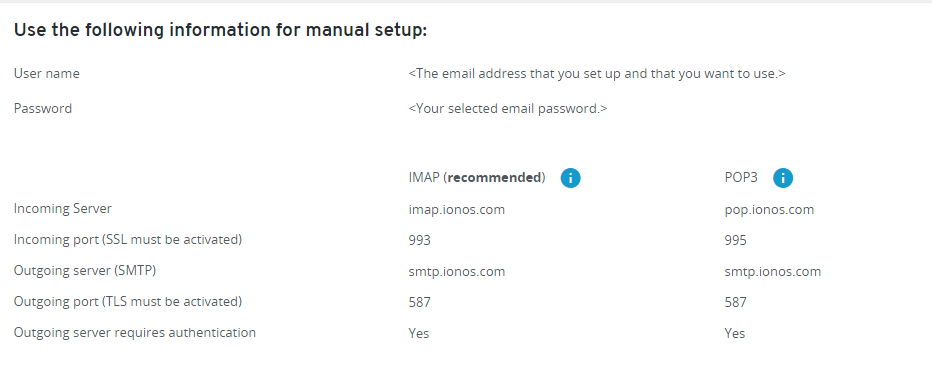
- Under Username enter your email address youremail@yourdomain.com. Enter the password you usually use for your email address on 1and1 email, Pop Server: pop.ionos.com and Port: 110, check the “Label Incoming messages”, (Note: if you would like to keep a copy of your emails on your 1and1 server, check the box “Leave a copy of retrieved message on the server.”) and finally click on Add Account.
- Check the box “yes I want to be able to send email as…” and click on Next Step.
- Enter the name you wish to show up when sending an email (leave the box treat as Alias checked) and click on next step
- SMTP settings: SMTP server should be smtp.ionos.com – the port should be 587, and TLS enabled. Enter your username youremail@yourdomain.com, enter your password and click on add account.
- The last step is to verify: They will email you a confirmation code. Login one last time to your 1and1 email account from 1and1.com webmail application, and open the email from “gmail Team”. Copy and paste the number and click on “verify”. The pop up disappears, you are all set!
Related Articles
Email Set Up with Siteground
To set up your email account with Microsoft Outlook, go to the File drop-down menu > Account Settings > Other Email. If you’re using Mac, go to Outlook > Preferences > Accounts. Select IMAP mailbox type You will be forwarded to fill in your account ...How-To: Verify Your Google Business Profile Via Video
Got your Google Business Profile setup and you’re ready to verify it? OR already have a Google Business Profile but Google is asking you to REverify it? This may sound like a tedious task, but we’re here to break it all down for you step by step. ...How To: Add a Users to Google Analytics
Working with a marketing or advertising agency who has requested to be added as an admin within your Google Analytics account? There are many reasons a marketing firm would need this type of access, but here at ARK, we use admin access to manage your ...How-To: Add a Delegate to Access Your Domain
Working with a marketing agency who has requested to be added as a user within your Google ad accounts or Facebook Business Manager? Do you need to give your new marketing agency domain access so that they can take over your website maintenance? Fret ...Benefits to Investing in Website Maintenance Services
Every company should have a top-notch website at the cornerstone of its business strategy. But once you’ve created your dream site, which can be a feat in and of itself, you can’t just leave it “as is” forever. There’s more than meets the eye when it ...